Sortable and Selectable Zebra Table Widgets

I decided to add zebra tables to a phpwebsite recently and used the version from the link below.

Sortable and Selectable Zebra Table Widgets

It took me a little while to accomplish since I needed to convince phpwebsite to not strip out the <thead>, <tbody>, and <tfoot> tags. Not many people use these tags so phpwebsite removes them unless you modify the configuration. To get the table to work I used both the ID and CLASS elements on the table tag. I used both the<thead> and <tbody> tags in the table although I think only the <tbody> tag is required.

  Pos Artist Trackname


1 Lost In The Plot The Dears
2 Poison The Constantines
3 Plea From A Cat Named Virtute The Weakerthans
4 Can’t pick me! No sir!
5 Living Room Tegan And Sara
6 Can’t pick me either Nope
7 Fast Money Blessing King Cobb Steelie
8 Sore Buck 65
9 Love Travel Danko Jones
10 You Never Let Me Down Furnaceface

WordPress 2.2.1

WordPress 2.2.1 is now available

WordPress 2.2.1

You can read the rest of the post for the details. I ran Winmerge against the new version and the old version. It showed that 40 files are changed and two files were added. It looks like an upgrade that lends itself to upgrading just the changed files. I have an interest in the changed files since I keep my websites in a Subversion repository.

In the past Mark on WordPress posted a zipped version of just the changed files but he appears to be busy with some personal issues like a new job and a wife. I actually used Winmerge to create a zipped file of just the changed files to see if it would work. It did. Mark had a different procedure. I may modify my upgrade procedure to use a zipped file after I do a little testing.

HIPAA audit: The 42 questions HHS might ask

A document obtained by Computerworld from a reliable source indicates that Piedmont was presented with a list of 42 items that HHS officials wanted information on within 10 days. Specifically, Piedmont was asked to provide policies and procedures for:

  1. Establishing and terminating users’ access to systems housing electronic patient health information (ePHI).
  2. Emergency access to electronic information systems.
  3. Inactive computer sessions (periods of inactivity).
  4. Recording and examining activity in information systems that contain or use ePHI.
  5. Risk assessments and analyses of relevant information systems that house or process ePHI data.
  6. Employee violations (sanctions).
  7. Electronically transmitting ePHI.
  8. Preventing, detecting, containing and correcting security violations (incident reports).
  9. Regularly reviewing records of information system activity, such as audit logs, access reports and security incident tracking reports.
  10. Creating, documenting and reviewing exception reports or logs. Please provide a list of examples of security violation logging and monitoring.
  11. Monitoring systems and the network, including a listing of all network perimeter devices, i.e. firewalls and routers.
  12. Physical access to electronic information systems and the facility in which they are housed.
  13. Establishing security access controls; (what types of security access controls are currently implemented or installed in hospitals’ databases that house ePHI data?).
  14. Remote access activity i.e. network infrastructure, platform, access servers, authentication, and encryption software.
  15. Internet usage.
  16. Wireless security (transmission and usage).
  17. Firewalls, routers and switches.
  18. Maintenance and repairs of hardware, walls, doors, and locks in sensitive areas.
  19. Terminating an electronic session and encrypting and decrypting ePHI.
  20. Transmitting ePHI.
  21. Password and server configurations.
  22. Anti-virus software.
  23. Network remote access.
  24. Computer patch management.

HHS also had a slew of other requests:

  1. Please provide a list of all information systems that house ePHI data, as well as network diagrams, including all hardware and software that are used to collect, store, process or transmit ePHI.
  2. Please provide a list of terminated employees.
  3. Please provide a list of all new hires.
  4. Please provide a list of encryption mechanisms use for ePHI.
  5. Please provide a list of authentication methods used to identify users authorized to access ePHI.
  6. Please provide a list of outsourced individuals and contractors with access to ePHI data, if applicable. Please include a copy of the contract for these individuals.
  7. Please provide a list of transmission methods used to transmit ePHI over an electronic communications network.
  8. Please provide organizational charts that include names and titles for the management information system and information system security departments.
  9. Please provide entity wide security program plans (e.g System Security Plan).
  10. Please provide a list of all users with access to ePHI data. Please identify each user’s access rights and privileges.
  11. Please provide a list of systems administrators, backup operators and users.
  12. Please include a list of antivirus servers, installed, including their versions.
  13. Please provide a list of software used to manage and control access to the Internet.
  14. Please provide the antivirus software used for desktop and other devices, including their versions.
  15. Please provide a list of users with remote access capabilities.
  16. Please provide a list of database security requirements and settings.
  17. Please provide a list of all Primary Domain Controllers (PDC) and servers (including Unix, Apple, Linux and Windows). Please identify whether these servers are used for processing, maintaining, updating, and sorting ePHI.
  18. Please provide a list of authentication approaches used to verify a person has been authorized for specific access privileges to information and information systems.

Source: HIPAA audit: The 42 questions HHS might ask

Jeff of the HIPAA Blog talks more about the questions here and that the questions are pertinent to all firms with information security requirements.

My Yahoo! Blog » Want meaty new modules? You got it.

I have been using My Yahoo and Yahoo mail since 1997. Every time I think I want to go somewhere else for mail or a different home page, the folks at Yahoo make a nice and welcome change. Recently they have revamped the functionality in both the mail and the My Yahoo page. The mail beta has been out for some time now so I am going to focus my comments on the My Yahoo page changes. Both the mail and My Yahoo pages are in beta so your mileage may vary.

Appearance

Switching over to the new beta was easy and relatively painless. I was pleasantly surprised that my old theme, Stars & Stripes, was not too garish. Although the theme was fun, I decided to change the color by personalizing the page. I tried beige initially but the lack of contrast made it harder on my eyes so I settled on blue. Note: I do not know how to switch back to my old theme.

Some of the things I noticed:

  • I prefer the new layout when I use a wide browser window.
  • If you add it to a new module to the page and the fonts look fuzzy you need to refresh your screen.
  • Switching between pages(e.g. Finance page) is pretty slow. I think this is due to the advertisement.

Modules

The next thing I needed to clean up was the modules. Some of the modules are not supported. Since most of the modules that did not appear were not too important to me, I deleted them.

I added a few new modules. The mail preview is a module I have used in the past and found it almost useless. It kind of works. It has Web 2.0ish preview that is useless for most of my email. I suppose I could use it to delete email if that function was available but I think I will keep a separate window open to my mail. I get way too much low priority mail for this small interface to do me much good.

The Market Summary is a module I have not used in the past. It’s nice although I do not know why I need to know the market summary.

The TV Listings interface benefits from the improvements to the interface. Scrolling to the next hour was quick. I like the new Weather module.

Movie Showtimes and Evite are two modules in appear to be in development. I wonder what the folks are going to do with del.icio.us and Flickr. 

My Yahoo! Blog » Want meaty new modules? You got it.

Installing the Messaging Security Agent from the Security Dashboard

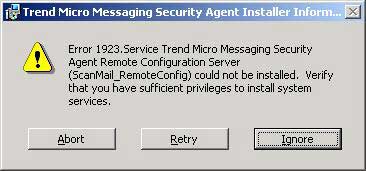
SMEX Error MessageThis week I upgraded the Trend Micro SMB installation on my “dog food” server to version 3.6. It kind of worked. The virus checking stuff upgraded nicely but the Messaging Security portion did not. I got this message, “Error 1923.Service Trend Micro Messaging Security Agent Remote Configuration Server(ScanMail_RemoteConfig) could not be installed”.

I researched the problem and it said I should check my privileges. After researching what privileges it was complaining about, I figured out that the privileges for the Administrator userid were just fine. So I rebooted and tried to install Messaging Security portion again. I was unsuccessful but this time it told me to install it from the Security Dashboard. I don’t remember seeing that message before but I was game. After a little research I found these instructions on how do this.

Installing the Messaging Security Agent from the Security Dashboard

These instructions were a little too short for me since the installation process asked me a few more questions than were included in the instructions. The installation process asked me which directory to install Messaging Security in and the “shared” directory. I was not sure what they wanted for the shared directory since this field was prefilled with C$. C$ looks like a “share” to me and I was clueless about a shared directory. If Trend Micro has a shared directory they want me to use, they hid it well. Since I was installing these files on my “H” drive, I assumed they wanted the “share” for the drive, H$. Anyway that is what I gave it. When I pressed the enter key, a screen showing the installation status popped up. The status screen updated several times over the next ten minutes before it finally completed. Now when I check the “Live Status” and “Security Settings” screens they show me that the Anti-spam is working. Since Microsoft’s Intelligent Messaging Filter catches most of the spam for my “dog food” server I got through this unscathed.

Free Firewall Software – Comodo™ Firewall

Comodo Free FirewallVersion 2.4

It’s Free. Forever. No Catch. No Kidding

Comodo Firewall Pro

The Award-Winning Comodo Firewall Pro
  • PC Magazine Online’s Editor’s Choice
  • Secures against internal and external attacks
  • Blocks internet access to malicious Trojan programs
  • Safeguards your Personal data against theft
  • Delivers total end-point security for Personal Computers and Networks

Install now for out-of-the-box protection against identity theft hackers, Trojans, scripts and other unknown threats

Free Firewall Software – Comodoâ„¢ Firewall

Yesterday I decided to upgrade my Trend Micro SMB software to version 3.6. While I was at it I decided to give their firewall another tryout. I was using Microsoft’s firewall so there must be something better. Within a few minutes I remembered why I was not using Trend’s firewall. Microsoft’s firewall is much easier to configure. If you have a bunch of exceptions to the rule, Trend Micro’s firewall is best forgotten.

Since I knew that there had to be a better firewall out there, I started looking around. Zonealarm is the traditional favorite. Comodo has a nice firewall that received some nice reviews recently and it is free, so I decided to give it a try. Since the online threats have morphed over the years I wanted a firewall that was easy and flexible to configure, have some built-in monitoring, and incorporate some application level filtering. The old port blocking firewalls are not very adept at catching the new online threats which take advantage of ports that are normally open(e.g. http-port80). It takes some application level filtering to catch the new threats. Comodo’s application level functionality reminded me of Microsoft’s ISA firewall. Microsoft’s ISA is a more robust product but Comodo’s application filtering looks pretty good.

Downloading and installing the program was easy. Configuring the program took me a lot longer since my laptop has an Apache web server, a FTP server, a MYSQL server, a Subversion server, and a VMware server on it and I wanted to restrict the access to these servers. The firewall will prompt you to add rules for specific programs. You can use the rules that the firewall creates but they were too general for me. So I changed them to be more specific. I restricted the ports and destinations available in each rule. My servers are for testing and development so there is no need to expose them to the world. Along the way I found out that I have a lot of chatty programs I have been ignoring and Google Desktop is the biggest culprit. It is amazing how many programs have to call home.

So far I have been impressed with the firewall. Its got great flexibility and monitoring capability. This is a nice addition to a layered approach to security.

RE: Windows Mobile: HTC Touch Adds Finger Groping to Windows Mobile 6

HTC TouchI think I have found my next phone. Hopefully it will not be priced like an iPhone. 🙂

Check this link for more information.
Windows Mobile: HTC Touch Adds Finger Groping to Windows Mobile 6