
Updated phpWebSite Bleuprint theme

In a previous post I started creating a phpWebSite theme based on Blueprint. My plan is to convert an existing phpWebSite to the latest version but a theme for the latest phpWebSite(1.3.0) is not ready yet. Since my idea of humor is frequently referred to as cheesy I am calling this new theme, Bleuprint.The theme has a lot of neat stuff since I incorporated a lot of toys into the theme. However, it is not ready yet. It is still a work in progress. At this time I have both the web page and article module pages on my front page. I am leaning to using the Article module for most of my content but I am still working through various annoyances. Make me a believer, Eloi!

My demo site is at http://demo1.wehuberconsultingllc.com/.

  1. Merged Blueprint into the default phpWebSite theme.
  2. Fixed phpWebSite annoyances.
    1. Create new module templates to replace the <h1> element with the more search engine friendly <h2>.
      1. Sitemap
      2. Blog
    2. Create a tabbed menu for the new site. I want to keep the tabbed menu design from the old site.
    3. Change the calendar colors and layout.
    4. Fix control panel layout problem for form designer with Firefox.
  3. Add new features to the template.
    1. Add jQuery support(http://jquery.com/) so I can use ThickBox for viewing photos(http://jquery.com/demo/thickbox/). Thanks to Cody and the folks supporting jQuery development.
    2. Add zebra table suppport via jQuery(http://tablesorter.com/). Thanks Christian! Note: You must edit the /config/core/textsettings.php file to allow <thead> tags. No thead, no worky!
    3. Add drop shadows to photos. I ported this visual toy from one of my favorite WordPress themes, Misty Look(http://wpthemes.info/misty-look/). Thanks to Sadish for creating a great theme!
    4. Add a rounded corner search box with jQuery field replacement. Thanks Brian! http://blog.reindel.com/2007/08/13/howto-spruce-up-your-search-box-with-css-and-a-background-image/
    5. Add CSS liquid rounded corner box to template. Thanks Mark! http://www.search-this.com/2007/02/12/css-liquid-round-corners
  4. Evaluate module support.
    1. Article 4.0 module(Remember to patch the control panel per the instructions).
    2. Mailto module(Not supported)
  5. Bugs and Redesign(?!)
    1. Where is Coming Soon in Calendar?
    2. Where is What’s Popular block for Articles
    3. See if I can create a list menu template of just simple <li> links.
    4. Redesign comment template to be more like copyblogger.  
Setting up PHPUnit to run the samples

In my last post I thought I had set up PHPUnit correctly. As I worked through the samples I found out that there were a few more problems.

  1. The first problem was finding the Framework folder used in the samples. This folder exists under the test tree. To make things easy I copied the Framework, Extensions, Runner, and Util folders over to my working directory. As I said in previous post my working directory, phpunit, is located under the htdocs folder.
  2. The ObserverTest sample did not work for me as shown in the documentation. It complained about the Subject object. I got the Observer object to run but I think section of the documentation should be re-written. Mock objects are important.
  3. The second problem I found was when I was trying to run the BankAccountTest. It threw a BankAccountException and it expected to find the BankAccountException class somewhere. Sebastian has a slide online with an updated BankAccount.php that referenced a BankAccountException.php. I looked all around for the file but I could not find it. So I created my own file. It does nothing except create the BankAccountException class by extending Exception. Now the BankAccountTest sample will run.
  4. Getting the code coverage feature to work was a bit trickier. If you have not enabled xdebug you will get a confusing error message. When you run PHPUnit with the code coverage parameter, “–report”, it will say that there is no report parameter. Huh!? When you run “phpunit –help” you will not see the report parameter. Hmm… I thought I had fixed this.
    1. Go back and make sure that you have enabled the extension in the php.ini file. Oops, I had enabled the extensions in the wrong file.
    2. After enabling the xdebug extension I got an error message when I ran PHPUnit.bat that complained about the version of xdebug.dll and PHP. I am running the latest version of PHP and the xdebug.dll version it is loading looks like it is pretty old. After a couple of iterations I got the configuration correct. You need to enable the xdebug extension as a ZEND extension with the full path to the most recent version of the DLL. The most recent version exists in my ext folder but it had a different name. For my version of XAMPP I added the following line, zend_extension_ts="C:\Program Files\xampp\php\ext\php_xdebug-2.0.0-5.2.2.dll". Now I get the pretty code coverage report.

So there you have it. I have gone through the examples and gotten all of them except one to work as expected.

Updating PHPUnit on XAMPP

I have decided to do some playing around with unit tests for PHP. I saw a video on Getting Involved in WordPress and it reminded me of my interest in unit testing. Now I almost want to create some unit tests for verifying WordPress plugins or phpWebSite code. Fortunately, common sense will prevail and I will restrict my activities to playing. The instructions at Chapter 3. Installing PHPUnit looked pretty easy but since I wanted to do my testing under XAMPP I knew there would be problems. Hopefully the problems would be minor.

Confirm the PEAR configuration

The first thing I did was to open a command window in the PHP directory under xampp and ran the following command.

pear show-config

This command prompting elicited an error about improperly set environment variables. So I edited the file and inserted the full path to the XAMPP directory. I tried the command again and it showed the PEAR configuration. I checked the installed packages and it showed PHPUnit to be version 1.3.2. I would like to use the latest version so I am going to follow the instructions from the documentation.

Update the channel and install the PHPUnit

The next commands I tried were to update the channel and install PHPUnit.

pear channel-discover pear.phpunit.de

pear install phpunit/PHPUnit

The channel command worked. The install command did not work since it wanted the a dependency updated, GraphViz. After updating the dependency I ran the install command again. It installed 3.1.7 and it said I could also install pdo_sqlite and xdebug. I tried to install these extensions but they ended with a DSP error.

Test the PHPUnit

To test the installation I created a new folder under htdocs called phpunit so that I would have all of the unit test files in one spot. I quickly found out that I needed a copy of the phpunit.bat file in that directory, too. This file is in the PHP folder and it has the correct path to the php.exe file. I copied the example ArrayTest from the documentation into a file called ArrayTest.php and ran the command, “phpunit ArrayTest“. It worked. Now I can move on to more sophisticated unit tests.

Final Fixups

After a little searching I found that the xdebug and pdo_sqlite extenstions already exist in the extensions folder. XAMPP installs all of the extensions but only enables a couple of them in the default installation. All I had to do was to edit the php.ini file, remove the semi-colon in front of these extensions, and restart the web server.

Communication Styles and the Future of phpWebSite

I have been pondering for some time whether to convert existing web sites from phpWebSite to WordPress. It is difficult for me to think about these things since I quickly jump to the implementation details. So I decided to back off and look at the problem from the viewpoint of communication styles. For this quick analysis I am going to compare the diary, magazine, and product brochure formats to their Internet counterparts. These communication styles have existed for a long time in printed form. I think a little pondering on where these formats came from and where the web site versions of these formats are going will give me a better strategic view.

Diary Format

  • History – The diary format is the model that blogs originally copied.
  • Frequent Updates – One of its characteristics is that it generally involves short posts on a daily basis. This feature of blogs was quickly adopted by news organizations for syndicating news over the Internet.
  • Conversational tone – A key characteristic of both diaries and blogs is that they have a conversational tone.

Magazine Format

  • History – The magazine format came about as printed magazines established a presence on the Internet.
  • Monthly Updates – Originally the web sites mimicked the printed version and were updated on a monthly basis. As magazine publishers adapted to the positive and negative impacts of the Internet on their business, they eventually adopted RSS syndication for more frequent news updates(daily) and email newsletters for less frequent updates(weekly).
  • Both formal and conversational tones – The magazine format has traditionally had a mixture of both a formal tone and a conversational tone. The articles had a professional/formal tone while the editorials has a more personal tone.

Product Brochure Format

  • History – The product brochure format came about as businesses wanted a web presence to support their sales operation. Originally these sites were fairly static web sites that reproduced the sales information that already existed in brochure form.
  • Infrequent Updating – Most of these sites were static sites. It was commonly understood that if you wanted current information you need to call them on the phone. Many business site have since migrated to dynamic content. FAQs became an easy and quick way to support customers after the sale.
  • Primarily a formal tone – For the most part the tone used by these sites can be described as professional.

So how does WordPress and phpWebSite stack up in these areas?

  1. WordPress
    • The origin of WordPress is as a blog and it is one of the best blogs out there. It has a great development community out there.
    • WordPress has shown a lot of versatility and has expanded into the magazine format. Here is an example of the magazine format, Darren Hoyt Dot Com » Blog Archive » Mimbo v1.1 Released.
    • Although you can use WordPress as a simple product brochure or Internet sales site, it does not scale up as well as other packages. A few months ago I wrote a post in which I said that a nonprofit with a “product brochure” styled site might be better served by going to a more conversational format.
  2. phpWebSite
    • The blog portion of phpWebSite was originally called Announcements. phpWebSite can function as a blog but WordPress is free and a better blog.
    • The magazine format is probably the best use for phpWebSite. The “What’s Related” feature is a great feature. Similar features can be added in WordPress via plugins. I think that articles and calendars are the areas of with the greatest potential over WordPress but the phpWebSite development community is more limited.
    • Like WordPress you can use phpWebSite as a simple product brochure site but it does not scale up as well as other packages. Using the template system for product brochures is tempting because it may integrate the key data while allowing it a bit more scalability.

So there you have it. Both WordPress and phpWebSite are pursuing the magazine formats but phpWebSite is a more natural fit for the magazine format at this time. WordPress has a much larger development community but it has many diverse interests. The primary interests for WordPress is the blog format so it is hard to tell who has the better development community in the magazine format area.

A little more spam filtering

P.S. Oh yeah… Les says it appears to nail most of this pdf spam

A little more spam filtering

I implemented this today. So far….so good!

Creating a new theme for phpWebSite 1.3.0

I finally bit the bullet and decided to create a new theme for the new version of phpWebSite. Part of my problem with starting this project is that I think that WordPress might be a better solution for these web sites. One of the big advantages that WordPress is an abundance of good looking, standards compliant themes. It probably would not be that hard to migrate one of the old phpWebSite sites into WordPress. The other site has a couple of features that would require a lot more research so I opted to proceed with the theme redesign project.

In a previous post I talked about the “Blueprint: A CSS framework”. I would like the new theme to most like Misty Look. In a previous post I mentioned that I have used this for a charity blog in the past. For kicks I want try out the Copyblogger theme, too. I also want to add jQuery support so that I can use ThickBox. So here is my plan.

Phase 1

  1. Create a new theme which merges Blueprint into the default phpWebSite theme.
  2. Fix phpWebSite annoyances.
    1. I will create new module templates to replace the <h1> element with the more search engine friendly <h2>.
    2. See if I can create a list menu template of <li> links.
    3. Create a tabbed menu for the new site. I want to keep the tabbed menu design from the old site.
    4. Change the calendar colors and layout.
  3. Add zebra tables, drop shadow, and ThickBox support.
  4. Redesign comment template to be more like copyblogger.
  5. Evaluate Article 4.0 module.

Status

At this point I have a workable replacement for the original site. Most of the stuff works but I am still checking it out. I have not made the changes to the comment template, the list menu template, or checked the new version of Article. I will probably be updating to the latest version(1.3.0) of phpWebSite on the demo site in the next couple of days. To view the results go to my demo site at http://demo1.wehuberconsultingllc.com/.

Phase 2

Now it is time for me to separate the specific theme data from the common theme data. I expect to create four theme variations and a theme to display a design grid.

  1. Default Blueprint
  2. Misty Look
  3. Copyblogger
  4. Copyblogger organic.
  5. Display grid

Phase 3

Convert the old data into the new phpWebSite format.

FavIcon from Pics — how to create a favicon.ico for your website

FavIcon from Pics — how to create a favicon.ico for your website

I just got finished creating a favicon from a picture and it looks good. This makes the process painless!

Installing/Updating WordPress with Subversion « WordPress Codex

Installing/Updating WordPress with Subversion « WordPress Codex

This is a neat way to keep my local copy of WordPress updated. I use the local version primarily to check theme changes and plugins.

  1. First I backed up my blog folder.
  2. Then I used TortoiseSVN to checkout a copy from http://svn.automattic.com/wordpress/tags/2.2.1/ to setup the blog folder with a clean version of WordPress.
  3. Then I copied the backup copy of my config data, plugins folder, and themes folder into this directory.
  4. Then I used the “Switch” command to update this version to the http://svn.automattic.com/wordpress/tags/2.2.2/ version.
  5. Finally I ran the upgrade.php file to make sure the database was updated.

This is a relatively painless way to make minor upgrades. Technically this should work for pretty major upgrades, too!

NotePad++ – Load config.xml failed

Recently I noticed an error when starting NotePad++, “Load config.xml failed”. NotePad++ proceeded to work with a slightly different skin but this error was annoying. The problem started well after my latest version upgrade so I am not sure what triggered the problem. I have been successful running the latest version of Notepad++ so I was pretty sure this problem would go away when they issued the next version. Today I finally got annoyed enough to fix the problem. The config.xml file in the Application Data folder for my profile had a zero length. I copied over a config.xml from the NotePad++ directory under Programs Files. This post in the sourceforge forum says about the same thing, http://sourceforge.net/projects/notepad-plus/forums/forum/331754/topic/1465204?message=4294797.

Blueprint: A CSS Framework

Blueprint is a CSS framework, which aims to cut down on your CSS development time. It gives you a solid CSS foundation to build your project on top of, with an easy-to-use grid, sensible typography, and even a stylesheet for printing.

Blueprint: A CSS Framework

I saw this a couple of days ago and decided this may be just the trigger to get me to redesign an old phpWebsite theme. The old theme works but it is kind of quirky since it started out as a table based layout theme. It could benefit from a redesign from the ground up. I have been yearning to redesign and clean up the theme for some time. Most of my theme ideas come from WordPress Themes so I was looking at porting one or more WordPress themes I like over to phpWebsite. It is debatable whether it makes sense to port over the themes since I could recreate the site in WordPress in about the same amount of time. I will mull over this a little while longer.

Adding RSS content to Outlook Today using jQuery

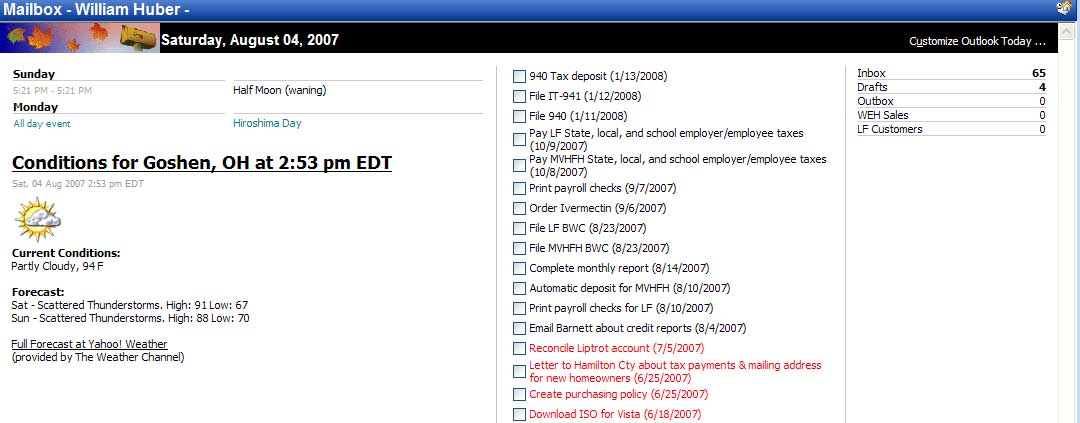
Customized Outlook Today
I decided to customize my Outlook Today page with jQuery. The change was pretty simple. My plan was to add the current weather forecast available from Yahoo via a RSS feed. The source for my inspiration was this post by Jean-François Hovine.

The only annoyance is that I get a popup window because I am accessing content in another domain. After a little bit of work this is what I ended up with.

Featured Windows Download: Bowl over corrupt installations with Windows Installer CleanUp Utility

Windows only: Freeware utility Windows Installer CleanUp Utility can remove Windows Installer configuration information from applications that refuse to install. Microsoft created the Windows…

Featured Windows Download: Bowl over corrupt installations with Windows Installer CleanUp Utility

I heard of this utility awhile back but quickly forgot about it since I did not have a use for it at the time. Today I have a use for this utility.

Featured Windows Download: Automate free software installations with Win-Get

Windows only: Freeware command line utility Win-Get is a Windows version of the popular Linux command line tool, apt-get. Win-Get can automate the installation of freeware applications with a simple…

Featured Windows Download: Automate free software installations with Win-Get

It may be useful. I am not sure right now.

Report to California Sec. of State Details Security Flaws in eVoting Systems (July 27, 28, & 30 2007)

A review of electronic voting systems commissioned by California Secretary of State Debra Bowen has been released, and the results are “not encouraging…….

Report to California Sec. of State Details Security Flaws in eVoting Systems (July 27, 28, & 30 2007)

This link will take you to the article on SANS site. If you want to read the actual report, click on the link below.

http://www.sos.ca.gov/elections/elections_vsr.htm