
Jeditable and Classic ASP

This week I implemented a grid style application using Classic ASP and Jeditable. The hardest part of implementing this application was trying to figure out what a save.asp version of save.php would look like. Here the template I created.

<%
dim sID, sValue,errorcode dim field1,field2,field3,field4
'The sID is a spreadsheet style ID
'As an example B3 would be the second editable field
'for DB ID field = 3
sID = request("id")
sValue = request("value")
sType = mid(sID,1,1)
sDataID = mid(sID,2)
'We have four editable fields
'The changed field will not be null
field1 = null
field2 = null
field3 = null
field4 = null
errorcode = 0
select case sType
case "A"
field1 = sValue
case "B"
field2 = sValue
case "C"
field3 = sValue
case "D"
field4 = sValue
case else
errorcode = 1
end select
if errorcode = 0 then
'Validate and update the data base
end if
if errorcode = 0 then
'Send back the value field
Response.Write sValue
else
Response.Write "<b>!Error " & errorcode & "</b>"
end if
%> 
WordPress › jQuery Lightbox « WordPress Plugins

I just changed out one of my WordPress Plugins. I generally use thumbnails of my images and let a plugin called Lightbox show a larger image when the image is clicked upon. Today I replaced WP Lightbox 2 plugin with jQuery Lightbox plugin. I was hoping to reduce the amount of JavaScript the page downloads and I was not disappointed. One one website I maintain the new plugin reduced the JavaScript downloaded from 161,100 to to 39,420 bytes. There are some minor formatting issues but I think I can handle that.

CSS Fix #1 – On the web site using CSS dropped shadows I had to add new selector to remove the dropped shadows.

#lightbox img {
background:none;
border:0;
padding:0;
}

CSS Fix #2 – One of my themes has tabs on the top and after installing jQuery Lightbox the body was overlaying most of the tabs. I found that I could restore the tabs and not cause any other problems if I removed the CSS attribute, “height: 100%”, from the body selector in the jquery.lightbox.packed.css.

WordPress › jQuery Lightbox « WordPress Plugins

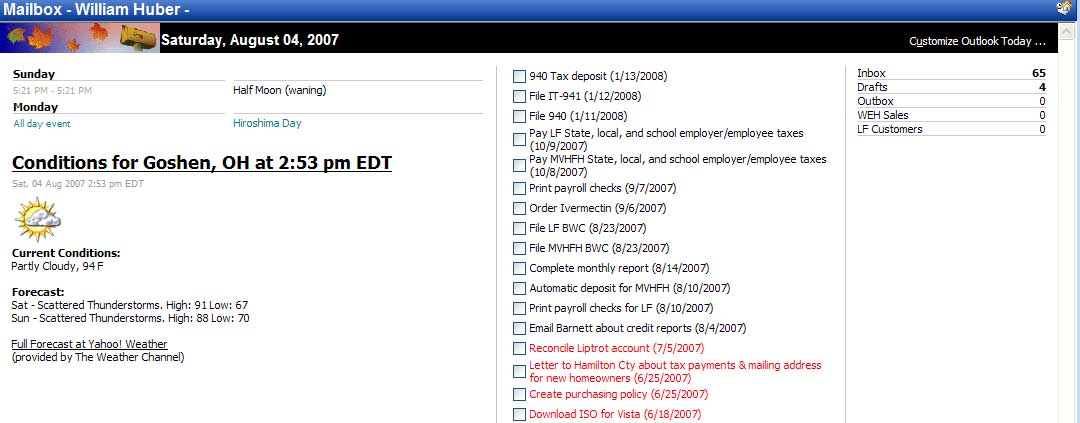
Adding RSS content to Outlook Today using jQuery

Customized Outlook Today
I decided to customize my Outlook Today page with jQuery. The change was pretty simple. My plan was to add the current weather forecast available from Yahoo via a RSS feed. The source for my inspiration was this post by Jean-François Hovine.

The only annoyance is that I get a popup window because I am accessing content in another domain. After a little bit of work this is what I ended up with.